




Almost all old printed photos, about 96%, are never looked at again after being developed. It leaves thousands of memories hidden in dusty albums and boxes. Most families store more than 5,000 analog photos alone. That vast backlog explains why millions are now turning to digital scanning tools for help.
People often ask if a single app can truly restore old, treasured photos into clear, shareable memories. The answer is YES! Photomyne has quickly gained attention for promising exactly that.
But does it deliver on its claims? In this review, we’ll dive deep into the Photomyne app, exploring its features, strengths, and areas where it could improve, helping you decide if it’s worth your time.
What is Photomyne?
Photomyne is a photo-scanning app that helps you save old memories with your phone. It turns printed photos into clear digital versions in just a few seconds. You simply have to point your camera, scan, and let the app process everything for you.
The tool auto-crops your images and removes glare when possible. It also groups your scans into albums, so you can keep everything organized. Many users like how fast the app works. It feels simple, even if you are new to scanning tools.
Moreover, you can edit, store, and share your photos right from the app. Its cloud backup keeps your memories safe across devices. These features make Photomyne a popular choice among people looking for an easy scanning solution.
A Quick Overview of the Photomyne Website
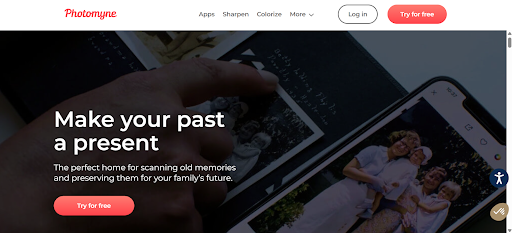
The Photomyne website gives you a simple way to explore the app and its features. You can move through the pages easily and find what you need in seconds. The site explains how Photomyne works and why many users trust it. It helps you understand what to expect before you start scanning your old photos. This makes the experience feel smooth and welcoming.
Key things you can check on the Photomyne website:
- Clear details about how the Photomyne app scans and saves photos.
- A simple breakdown of plans, pricing, and what each option includes.
- Real user reviews that show how the app performs in daily use.
- Helpful guides that explain scanning tips for better results.
Understanding the Photomyne App
The Photomyne app helps you turn old prints into clear digital photos in minutes. The website and app are synced. If you start editing at one place, you can finish at another. You open the app, scan your photos, and let the system crop and enhance them. It feels quick, easy, and made for anyone who wants a smooth experience.
Here’s what you get with the Photomyne app:
- Scan single or multiple photos with your phone.
- Let the app auto-crop and enhance each image.
- Save photos into albums for better organization.
- Back up files to the cloud so you never lose them.
- Edit, rotate, and share photos with simple tools.
How to Get Started with the Photomyne App
To start editing with Photomyne, follow the simple steps below.
Step 1: Download and Set Up the App
Open the App Store or Google Play and search for the Photomyne app. Install it and create your account. The setup takes only a minute. This step helps you start your Photomyne reviews journey with ease.
Step 2: Scan Your First Photo
Open the camera inside the app. Hold your phone above the photo and keep your hand steady. Press and hold the scan button for a few seconds. The Photomyne app captures the image and saves it instantly.
Step 3: Let Photomyne Process Your Scan
Photomyne auto-crops and enhances your image. You don’t need to adjust anything. The app creates an album and organizes your photos neatly. This feature makes the Photomyne review experience smooth.
Step 4: Edit and Save Your Photos
Open any scanned photo to edit. You can crop, rotate, or adjust the image. Save your changes and back them up to the cloud. This keeps your memories safe and easy to access.
Photomyne Free Vs Paid
| Feature / Capability | Free Version | Paid Version |
| Scan photos | Yes, but limited | Unlimited scans |
| Auto-crop and enhancement | Basic features | Full enhanced processing |
| Save photos to the device | Limited access | Full access to all exports |
| Cloud backup | Not included | Included with unlimited storage |
| Access on multiple devices | Not available | Available across devices |
| Photo editing tools | Basic tools | Full suite of editing options |
| Colorization and enhancement | Limited | Unlimited |
| Sharing options | Restricted | Unlimited share and download options |
| Support | Basic | Priority support |
Features of the Photomyne App
The Photomyne app makes it easy to scan old photos and bring your memories back to life with simple tools anyone can use.
- Multi-Photo Scanning: The Photomyne app scans several photos at once. It auto-detects edges and saves each image fast. You stay in control and keep your memories clear without extra steps.
- Auto-Cropping: The app crops each photo automatically. It reduces manual work and keeps images neat. You get clean results even when you scan older, faded prints.
- Cloud Backup: The Photomyne app backs up your photos instantly. You never worry about losing files. Your memories stay safe and accessible on any device.
- Editing Tools: You can rotate, crop, and adjust colors with ease. The tools feel friendly and fast. You stay focused on improving each scanned memory.
- Organized Digital Albums: The app groups your scans into tidy albums. You can rename and date them quickly. This helps you track family moments without confusion.
How Much Does Photomyne Cost?
Photomyne offers flexible subscription plans to suit different needs. The annual plan is the best value at $5 per month, billed as $59.99 yearly. It also includes a 3-day free trial and a free long flexible phone mount, helping you scan photos more comfortably.
For those who prefer short-term options, the monthly plan costs $19.99 with no free trial. There’s also a one-shot plan for $119.99, which is ideal if you want a single full access without recurring payments. All plans auto-renew but can be canceled anytime.
Users Reviews Of Photomyne
Photomyne app reviews have mixed opinions from users. Some of them like the features and services, while others do not find this tool really helpful. So, here are some reviews of Photomyne.
Review 1:
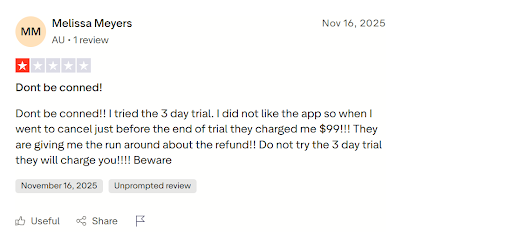
Melissa Meyers shows her disappointment with Photomyne. She did not like it and had concerns about payments.
Review 2:
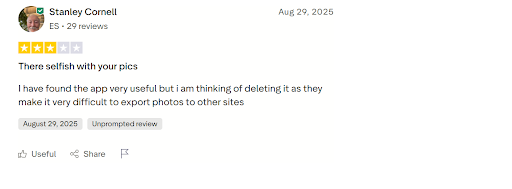
Stanley Cornell finds the application helpful. But he also faces some issues regarding the export of pictures.
Strengths And Limitations of the Photomyne App
Strengths of the Photomyne App
- Quickly scans multiple photos at once, saving time.
- Automatically enhances photo quality for clarity.
- Easy-to-use interface suitable for all ages.
- Supports both color and black-and-white photos.
- Allows cloud backup to prevent photo loss.
- Enables sharing scanned images via social media or email.
- Helps organize photos into albums for better management.
Limitations and Areas for Improvement
- Some older or damaged photos may not scan perfectly.
- Limited free features; full access requires a subscription.
- Occasional glitches when scanning very large photo batches.
- Editing options are basic compared to dedicated photo apps.
- Offline functionality is limited; cloud features need internet.
- Could add more advanced AI restoration for severely faded images.
Alternatives to Photomyne
| App Name | Key Features | Pricing (Approx.) | Best For |
| Google PhotoScan | Scans photos with glare reduction, auto-crop | Free | Quick, high-quality scanning |
| Microsoft Lens | Multi-document scanning, auto-enhancement | Free | Versatile scanning needs |
| TapScanner | Batch scanning, editing tools, and cloud backup | Free / In-app purchases | Easy organization of photos |
| Photomyne Lite | Similar features to Photomyne, smaller subscription | Free / $9.99 monthly | Budget-friendly alternative |
| ScanMyPhotos | Bulk scanning service, mail-in option available | $0.69–$1 per photo | Large photo collections |
Final Thoughts
Photomyne stands as a modern tool that bridges the gap between the past and present. It empowers users to preserve cherished memories while embracing technology. Though no app is perfect, Photomyne’s approach opens new possibilities for memory preservation, making it more than just a scanning tool; it’s a gateway to keeping moments alive for generations to come.
Frequently Asked Questions
Photomyne enhances clarity but may not fully restore heavily damaged photos; advanced restoration may need specialized software.
Yes, the app offers secure cloud storage and ensures your images remain private.
Basic scanning works offline, but cloud backup and sharing require an internet connection.
Photomyne focuses exclusively on photos and does not currently handle videos.
Yes, scanned albums can be shared, allowing family members to view and download images easily.
Yes, Photomyne can be worth it, especially if you want a quick, easy way to digitize and preserve many old photos at once.