




Passwords are a headache for adults, let alone kids.
Between school accounts, online games, and educational apps, children are being asked to create and remember secure passwords earlier than ever. Most of the time, kids use weak passwords like “1234” because they don’t realize the consequences. These easy choices leave them open to cybercriminals and hackers.
193 billion accounts were affected by credential stuffing attacks in 2022, which leverages reused passwords, according to Sangfor. It shows that creating strong passwords is the number one way to prevent personal information from being abused online.
With schools and online activities requiring digital accounts, kids are becoming easier targets for bad actors. Fortunately, Dinopass offers a simple, free solution designed specifically for young users.
In this blog post, I will discuss the Dinopass in detail, including why parents and educators trust this tool for children’s password security.
What Is Dinopass?
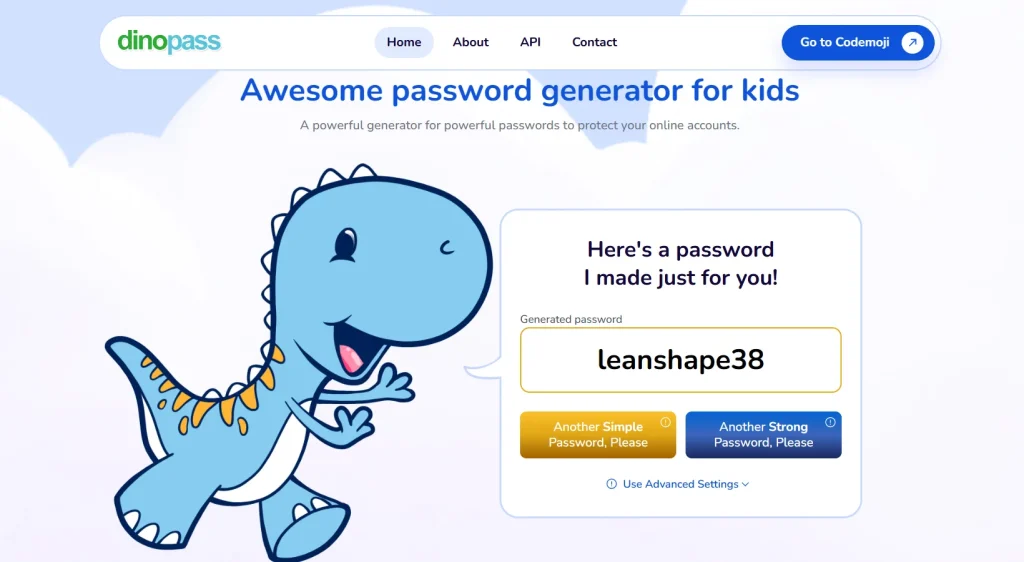
Dinopass is a simple, free web-based password generator that is used to generate passwords that are memorable and strong. It is mostly aimed at children, students, and casual users. It also solves the universal problem of forgetting tricky passwords by using pre-approved lists of words to generate a password.
Its interface is the basic one with a dinosaur mascot. The service is focused on ensuring safety and, therefore, does not store generated passwords, as privacy is paramount.
As one of the education-oriented organizations, it is also maintained by Codemoji. It is a free API that developers can use to add password generation features to their applications, and thus is a valuable tool for individual use and for IT professionals creating first-time user credentials.
How Dinopass Works?
The mechanics behind Dinopass are deliberately simple. This simplicity makes it perfect for children while maintaining reasonable security standards.
Two Password Types Available
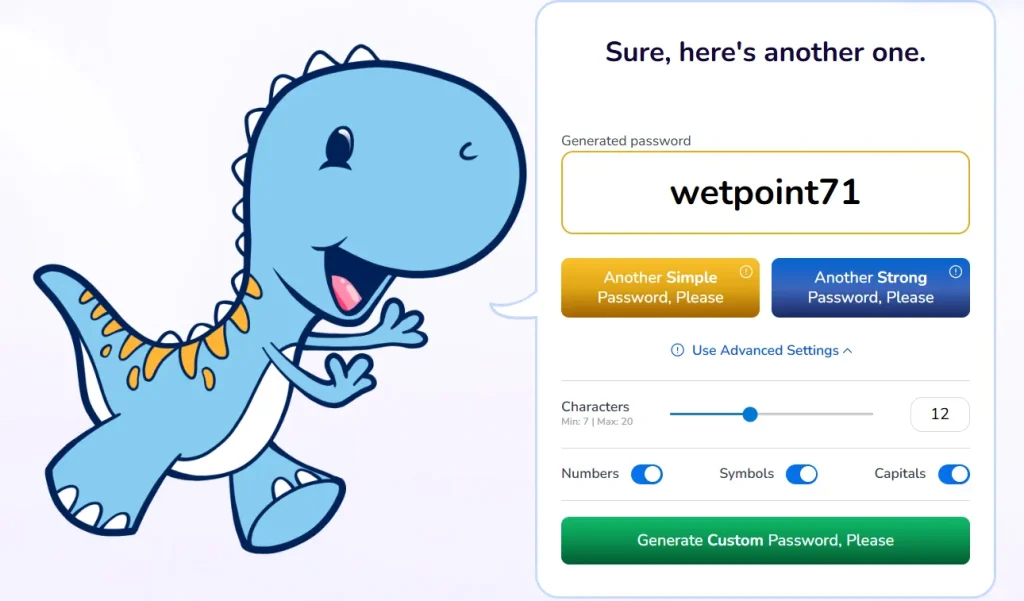
The tool generates two distinct password types. Simple passwords contain only lowercase letters and numbers. These create combinations like “dino1234” or “purple99.”
Simple passwords are designed to be easy to remember. However, the trade-off is that they’re also easier to crack. They work well for casual accounts with minimal sensitive information.
Strong passwords use a mix of upper- and lowercase letters. They also include special characters like @, $, or! Plus numbers. These are best used for important things, such as email accounts.
When using Dinopass, you can decide whether security or memorability is more important. Parents should guide children toward strong passwords for critical accounts.
The Generation Process
Visit the Dinopass website to begin. The tool does not require any personal information to get started. There are no limits on the number of generation attempts either.
A password appears automatically on the homepage. Click the “Another Simple Password” or “Another Strong Password” buttons for new options. If you generate several passwords that aren’t easy to remember, keep developing new ones until something sticks.
As soon as you enter the site, a random password is automatically generated. It won’t repeat previous suggestions. This ensures truly unique options every time.
Word Database Selection
The passwords come from a large set of preselected words. Dino has gone to some effort to ensure there are no offensive words. There are also no possible offensive combinations in the system.
This careful curation makes Dinopass safe for school environments. Teachers can recommend it confidently without worrying about inappropriate language appearing. Codemoji has gone to some effort to ensure age-appropriate content.
The word selection includes familiar, easy-to-spell terms. Children can actually remember these passwords without writing them down. This reduces the temptation to create insecure storage methods.
Why Dinopass Is Safe for Kids?
Safety concerns drive every parental technology decision. Dinopass addresses multiple security considerations effectively.
No Data Storage
The passwords it generates are not stored on its servers. This means there is no risk of Dinopass being hacked or of passwords being stolen. Generated passwords are only available temporarily in your browser.
This stateless approach eliminates major security vulnerabilities. Hackers can’t steal password databases that don’t exist. Furthermore, your child’s passwords never transmit to external servers for storage.
When you close the browser or navigate away, the password disappears completely. No traces remain on Dinopass servers or in their systems.
No Personal Information Required
One of the best things about DinoPass is that it does not ask for any personal information. There are no sign-ups, logins, or forms to fill out.
This approach significantly lowers the risk of data leaks or breaches. Children don’t provide names, ages, email addresses, or any identifying details. Parents appreciate this privacy-first design. This significantly lowers the risk of data leaks or breaches.
HTTPS Encryption
The website uses HTTPS protocol for secure connections. Dino Pass uses HTTPS, which means the connection between your browser and the website is encrypted.
This security measure protects against malware attacks. Any data transmitted between your browser and Dinopass remains private. It’s a good sign that developers take basic website security seriously.
Clean, Ad-Free Interface
The website is visually appealing and easy to use. There are no ads or links that can take your child to sketchy corners of the internet.
Everything is confined within a clean, distraction-free layout. Children won’t accidentally click misleading advertisements or confusing navigation elements. The single-purpose design keeps the focus exclusively on password generation.
Pros and Cons of Dinopass
Dinopass is a fun, kid-friendly password generator that balances ease of use with security, but like any tool, it has both strengths and limitations:
Pros of Dinopass
- Kid-Friendly Design: Simple interface with colorful visuals makes it approachable for children.
- Memorable Passwords: Generates readable combinations (e.g.,
happy-dino-42) that kids can recall without writing them down. - Two Security Levels: Offers both “Simple” and “Strong” password options, giving parents flexibility depending on the account type.
- No Personal Data Required: Dinopass doesn’t collect names, emails, or sensitive information—reducing privacy risks.
- Encourages Good Habits: Helps kids learn the importance of using unique passwords early on, building lifelong cybersecurity awareness.
Cons of Dinopass
- Not the Strongest Security: While stronger than a child’s self-made password, Dinopass passwords may not be as complex as those from advanced random generators.
- Limited Customization: Parents can’t tweak rules (like adding special characters or longer lengths) beyond the two preset options.
- Best for Low-Risk Accounts: Ideal for school apps or games, but not recommended for highly sensitive accounts (like banking or parental logins).
- Potential Over-Simplification: Kids may rely too much on “simple” passwords, which could be easier to guess if reused across multiple accounts.
Educational Benefits for Children
Dinopass serves as more than just a tool. It provides valuable opportunities for teaching digital citizenship.
Building Good Password Habits Early
Teaching kids about password safety and management is essential. The increasing number of online activities and password-protected accounts makes early education essential.
Children learn that passwords require thought and care. They discover that “password123” isn’t acceptable for essential accounts. These lessons establish foundations for lifelong security practices.
Teaching kids about cybersecurity does not have to be boring.
When you use a tool like DinoPass, it can be a stepping stone to teach them the importance of keeping their information private.
Understanding Password Strength
Dinopass visually demonstrates the difference between simple and strong passwords. Kids see that complex passwords offer better protection. Simple passwords are easier to remember but may also be easier for others to guess.
This comparison helps children understand the trade-offs in security. They learn to evaluate which accounts require the most protection. Email accounts require strong passwords, while casual gaming sites might accept simpler ones.
The two-tier system introduces security concepts without overwhelming young minds. It presents choice and teaches decision-making skills simultaneously.
Practical Cybersecurity Lessons
The tool not only helps kids create secure passwords but also educates them on cyberbullying, digital citizenship, and making smart media choices.
Parents can use Dinopass as conversation starters. Discuss why passwords matter, what hackers do, and how to stay safe online. These practical lessons stick better than abstract lectures.
The friendly interface reduces anxiety around security topics. Children feel empowered rather than scared about online safety.
How to Use Dinopass with Your Kids?
Implementation strategies help maximize Dinopass benefits. Follow these practical approaches for the best results.
Step-by-Step Guide
Using Dinopass is simple. Grab your laptop, PC, or mobile device. Open a new browser and type “Dinopass” into the search bar.
Click on the official Dinopass.com website from the results. The homepage automatically displays a password you can copy. Additionally, click the “Another Simple Password” or “Another Strong Password” buttons to generate new options.
Try several passwords together with your child. Let them evaluate which ones they can remember easily. If you generate several passwords that aren’t easy to remember, you can keep developing new ones until something sticks.
Teaching Memorization Techniques
Help children develop memory strategies for their passwords. Create stories or mnemonics connecting password words together. Passwords composed of lowercase letters and numbers are easy to remember.
Practice typing the password several times immediately after generation. Muscle memory helps retention significantly. Have children log in multiple times the first day to reinforce the pattern.
Write passwords down temporarily while learning them. Store written copies securely at home, not in backpacks or public places. Remove written reminders once memorization is complete.
Creating Password Management Systems
Even with memorable passwords, kids need organization. By using Dinopass, parents and educators can ensure that children develop good online habits and stay safe while exploring the digital world.
Consider introducing age-appropriate password managers as children mature. These tools safely store multiple passwords encrypted. They teach database management concepts practically.
Maintain a secure family password document at home. Store it physically in a locked location. Update it whenever children create new accounts or change passwords.
Final Thoughts
In the modern age of the internet, it is crucial to protect children on the internet. Dinopass is the final password generator safe to use by children that a parent and an educator can be sure will provide a memorable and safe password without relying on any personal information.
Having Dinopass with my family, I am free knowing that no one can hack my account into the hands of hackers. It is rather easy and fun to educate about password safety, as the interface is simple and without advertisements.
Promote these positive online behaviours among your children by suggesting the use of hard passwords. Opt for the safer and less stressful path by preparing only Dinopass today and providing the internet peace and security of your kids with long and memorable passwords.