



Close Menu
StuffaBlog – Entertainment, Celebrity & Lifestyle News
  • Trending News
    • Tech News
    • Environment
  • Business
    • Startup
    • Marketing
    • Cryptocurrency
    • eCommerce
    • Finance
    • Real Estate
      • Commercial Real Estate
      • Home Improvement
        • Home Decor
    • Inventory Management
    • Management & Leadership
  • Tech
    • Gadgets
      • Laptops
      • Smartphones
      • Computers
    • AI & ML
    • IoT
    • Software
    • Apps
      • App Development
    • Automobiles
  • Digital Marketing
    • Social Media
      • Youtube
      • Instagram
      • Facebook
      • TikTok
      • Snapchat
    • SEO
    • Blogging
      • Web Design
      • Web Development
    • Email Marketing
    • Content Marketing
  • Entertainment
    • Gaming
      • Games
      • Mobile Games
    • Movies and TV Shows
    • Celebrities Gossip
    • Sports
    • Fashion
  • Health
    • Fitness
    • Lifestyle
    • Health and Safety
    • Insurance
    • Mental Health
      • Wellness and Self-Care
  • Travel
    • Europe
    • Asia
    • Travel Tips and Hacks
      • Family Travel
      • Solo Travel
      • Budget Travel
      • Adventure Travel
    • Travel Destinations
    • Travel Itineraries
  • How-to Guides
  • More
    • Net Worth
    • Top 10
    • Reviews
      • Alternatives
      • Tools
    • Sponsored Content
  • Real Estate Investments
  • Parties
  • Books and Literature
  • Google
  • Healthy Recipes
  • Food

Subscribe to Updates

Get the latest creative news from FooBar about art, design and business.

What's Hot
Drake Releases Forty-three New Songs In Massive Album Drop

Drake Shocks Music World by Dropping Three Full-Length Albums Simultaneously

May 15, 2026
Infographic showing a credit score meter and financial analysts on a red news banner.

Why Are Credit Scores Factored into the Interest Rate for Secured Loans?

May 15, 2026
Drake Ignites Kendrick Lamar Feud with "1 AM in Albany" Leak

Drake Sparks Fresh Kendrick Lamar Feud Rumors with Cryptic “1 AM in Albany” Leak

May 14, 2026
Facebook X (Twitter) Instagram
Trending
  • Drake Shocks Music World by Dropping Three Full-Length Albums Simultaneously
  • Why Are Credit Scores Factored into the Interest Rate for Secured Loans?
  • Drake Sparks Fresh Kendrick Lamar Feud Rumors with Cryptic “1 AM in Albany” Leak
  • Katy Perry’s Viral “Beer Toast” to Ex Josh Groban’s Engagement
  • Hayden Panettiere Reclaims Her Narrative Over “Heartbreaking” Daughter Rumors
  • Chelsea Handler and Tom Brady Ignite Viral Chaos at Netflix’s Kevin Hart Roast
  • How a Professional Enterprise Networking Card Helps Businesses Generate More Leads 
  • Ciara Miller Ignites Bravo Feud After Accusing West Wilson of Sleeping with Jennifer Fessler
StuffaBlog – Entertainment, Celebrity & Lifestyle News
  • Home
  • About us
  • Contact us
Facebook X (Twitter) Instagram Pinterest YouTube LinkedIn
  • Home
  • Entertainment
  • Celebrities
    • Actors
    • Musicians
    • Influencers
  • Net Worth
    • Music Wealth
    • Film Wealth
    • Athletes Wealth
    • Digital Wealth
  • Lifestyle
    • Travel
  • Trending News
    • Celebrity News
    • Industry News
    • Awards
StuffaBlog – Entertainment, Celebrity & Lifestyle News
Home»Software»RDP Network Ports Explained With Steps To Configure And Secure Remote Desktop Access
Software

RDP Network Ports Explained With Steps To Configure And Secure Remote Desktop Access

Fartash ShahzaibBy Fartash ShahzaibOctober 22, 2025No Comments7 Mins Read
Facebook Twitter Pinterest LinkedIn Tumblr Email
RDP Network Ports Explained
Share
Facebook Twitter LinkedIn Pinterest Email Copy Link
Table of Content
  1. What Is An RDP Port?
  2. How Does RDP Use Port 3389?
    1. Communication Process
  3. How To Change RDP Port Listening From 3389
    1. 1. Open Registry Editor
    2. 2. Go to RDP Settings
    3. 3. Locate the PortNumber
    4. 4. Change the Port
    5. 5. Restart the Computer
    6. 6. Update Firewall Settings
    7. 7. Test the Connection
  4. Are There Other Ports For RDP?
  5. What Are The Main RDP Security Issues?
    1. Unsecured Ports
    2. Credentials Theft
    3. Server Exploits
    4. Protocol Tunneling
    5. Session Hijacking
    6. Ddos Attacks
  6. How To Secure RDP Port?
  7. What Port Ranges Can Be Used for RDP?
    1. Tips for Choosing Alternative RDP Ports
  8. Closing Insights on RDP Configuration
  9. Frequently Asked Questions

Many people don’t realize that a single open RDP port can invite hackers straight into their system. Remote Desktop makes it easy to manage computers from anywhere, but if it’s not secured, it becomes a serious risk. 

Cybercriminals often scan for the default RDP port, 3389, looking for weak points to attack. Therefore, it is necessary to understand how RDP network ports work, why leaving the default one open is dangerous, and how to change it safely. 

In this blog, you’ll also learn how to secure your remote access and protect your network from unauthorized connections. Let’s make your RDP setup safer and more reliable.

What Is An RDP Port?
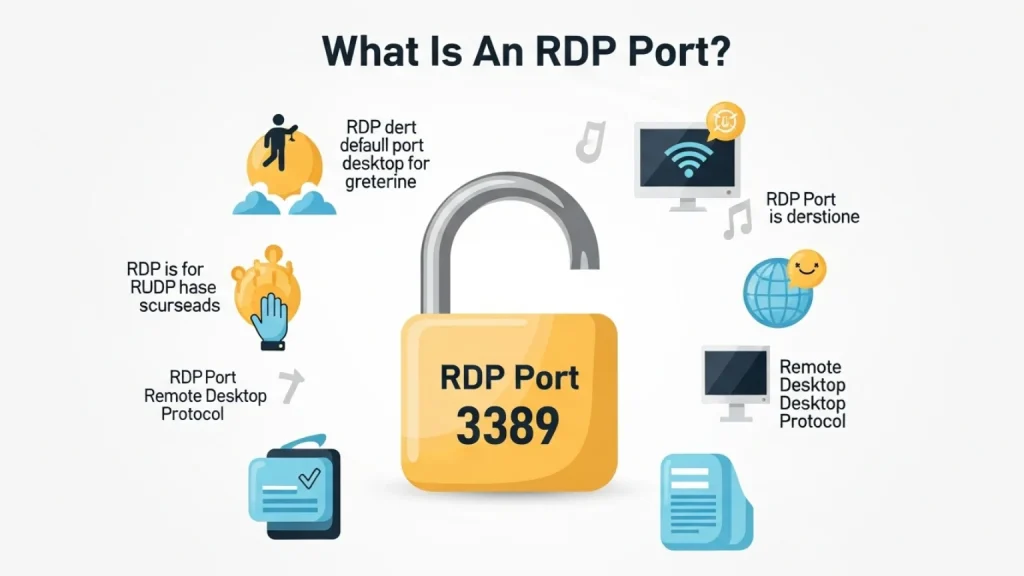
An RDP port allows one computer to connect to another remotely. It uses the Remote Desktop Protocol, developed by Microsoft. This protocol helps users control another device through a network. The RDP port works like a communication gateway between systems. 

By default, it uses port 3389 to send and receive data. When a remote session starts, the port transfers screen visuals and user inputs. It allows IT teams and users to manage systems without being physically present.

How Does RDP Use Port 3389?
Remote Desktop Protocol (RDP) uses port 3389 for communication between devices. This port allows remote connections over a network. When you use RDP, your computer connects through this port to another system.

Communication Process

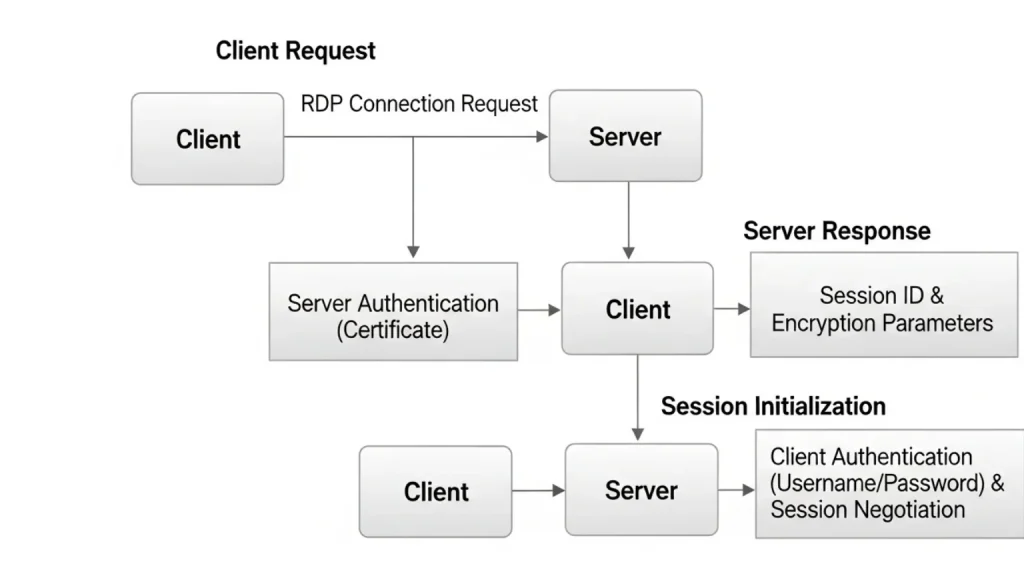
The communication starts when a client sends a request through port 3389. The data travels using TCP/IP. RDP encrypts this data to keep it private. The communication process consists of three main steps.

  1. Client Request: When you open Remote Desktop, your device acts as a client. It sends a signal to the target computer using port 3389. The client also shares login details for verification.
  1. Server Response: The server receives the request and checks the login credentials. If they match, the server grants access. It then sends configuration data back to the client. This includes screen settings, session details, and user permissions.
  2. Session Initialization: After authentication, the session starts. The user can now see and control the remote desktop. The client displays the server’s desktop in real time. All actions are transmitted securely through port 3389.

How To Change RDP Port Listening From 3389

Changing the default RDP port can help protect your system from attacks. Follow these steps carefully to change the port.

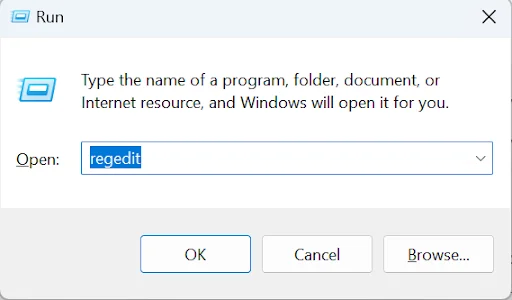
1. Open Registry Editor

Press Win + R, type regedit, and press Enter.
2. Go to RDP Settings

Navigate to: “HKEY_LOCAL_MACHINE\SYSTEM\CurrentControlSet\Control\Terminal Server\WinStations\RDP-Tcp”

3. Locate the PortNumber

In the right pane, find the PortNumber entry.

4. Change the Port

Right-click PortNumber, select Modify, and set the Base to Decimal. Type your desired port, for example, 3390, then click OK. Avoid using ports reserved for other services, especially below 1024.

5. Restart the Computer

Close the Registry Editor and restart your PC to apply the new port.

6. Update Firewall Settings

Open Windows Defender Firewall or your Windows firewall tool. Add a new inbound rule for TCP traffic on the new port. Update your router or other firewalls if necessary.

7. Test the Connection

Use your RDP client to connect with the new port: “hostname_or_IP:3390”

Are There Other Ports For RDP?

RDP primarily uses port 3389, but you can change it or use alternative ports for security or custom setups. Below is a table showing other ports that can also support Remote Desktop Protocol.

Port NumberPurposeWhen It’s Used
3389 (Default)Default RDP port for Windows systems.Used for standard remote desktop connections.
3390Custom port for RDP.When users change the default port to reduce attacks.
3388Alternate RDP port.Used in environments running multiple RDP servers.
443 (HTTPS)Secure RDP through an SSL tunnel.Used when RDP is routed via secure HTTPS.
22 (SSH)Used for tunneling RDP through SSH.Common in Linux or secure network setups.

What Are The Main RDP Security Issues?

RDP offers easy remote access, but it also opens doors for hackers. Common threats include the issues discussed below.

Unsecured Ports

Leaving RDP ports open makes your network vulnerable. Attackers can scan and exploit them easily. The default port, 3389, is a popular target. Change it to a non-standard port to reduce risk. Always use a firewall to limit who can connect and monitor incoming traffic for suspicious activity.

Credentials Theft

Weak or reused passwords are a hacker’s dream. Cybercriminals use brute-force attacks to guess login details. Once they gain access, they can steal sensitive data. Use strong passwords, enable multi-factor authentication, and avoid sharing credentials.

Server Exploits

Outdated servers often have vulnerabilities. Hackers can use these flaws to take control of your system. Regular patching helps fix known issues. Keep your operating system and RDP client updated. It’s a powerful way to prevent unauthorized access and maintain server security.

Protocol Tunneling

Attackers may hide malicious activity by tunneling RDP traffic. This makes it harder to detect intrusions. To prevent it, use VPNs or secure gateways for remote access. They encrypt data and block unauthorized tunnels.

Session Hijacking

During an active RDP session, hackers can intercept and take control. This often happens when encryption is weak. Always use the latest RDP version with strong encryption. Limit session access and log out when not in use.

Ddos Attacks

Hackers can flood your RDP server with fake traffic, causing downtime. These attacks disrupt access and drain resources. Use firewalls, rate limiting, and intrusion detection systems. They help filter malicious traffic. Consistent monitoring ensures your remote access remains stable and secure.

How To Secure RDP Port?

  • Use Strong Passwords: Always create complex passwords for RDP accounts. Avoid common words or patterns.
  • Enable Network Level Authentication (NLA): NLA ensures users authenticate before connecting. It adds an extra layer of security.
  • Limit RDP Access by IP: Only allow trusted IP addresses to connect. This reduces exposure to attacks.
  • Change the Default RDP Port: Switching from port 3389 makes it harder for hackers to find your RDP.
  • Enable Two-Factor Authentication (2FA): 2FA adds a second verification step, preventing unauthorized access.
  • Keep Systems Updated: Regularly update Windows and software to patch vulnerabilities.
  • Monitor RDP Logs: Check connection logs for suspicious activity. Respond quickly to unusual attempts.

What Port Ranges Can Be Used for RDP?

RDP sometimes uses TCP and UDP ports to connect a client to a host. The default port is 3389. You can change it for security or network needs. Always pick a port that is free and not used by critical services.

RangePort NumbersDescription
Well-known ports0–1023Reserved for system services like HTTP, SSH, FTP
Registered ports1024–49151Safe for user-defined services, including RDP
Dynamic/Private ports49152–65535Temporary or private ports, suitable for custom RDP

Tips for Choosing Alternative RDP Ports

  • Avoid common ports like 80, 443, 21, and 22.
  • Use ports near 3389, such as 3390, 3391, or 3395.
  • Dynamic range ports, like 50000, 55000, or 59999, reduce visibility to scans.
  • Always check that the port is free and allowed in firewall rules.
  • Document changes clearly for all users and admins.

Closing Insights on RDP Configuration

Changing your RDP port is like giving your system a secret door. Hackers scanning the default 3389 port won’t even know your new entry point exists. It’s a small tweak, but it makes a big difference in security. Just edit the registry, update your firewall, restart, and you’re good to go.

You can also learn in detail about the Windows Modules Installer Worker to keep your system working smoothly.

Frequently Asked Questions

Do I Need To Restart My Computer After Changing The RDP Port?

Yes, a restart is necessary for the new port setting to take effect. Without restarting, RDP may continue using the old port, and the change won’t work.

Will Changing The RDP Port Improve Security?

Changing the default port makes your system less visible to automated attacks targeting port 3389. It does not replace other security measures, but it adds an extra layer of protection.

Do I Need To Update My Router After Changing The RDP Port?

If you use port forwarding to access RDP from outside your network, you must update the router settings. For local network connections, router changes are not required.


Cchange RDP port Network protection Port 3389 RDP security Remote access Windows firewall
Share. Facebook Twitter Pinterest LinkedIn Tumblr Email
Previous ArticleWhy VPNs as a Solution to Corporate Data Leaks? Top Reasons
Next Article Top 10 Places to Visit on a Turkey Group Tour
Fartash Shahzaib

Fartash Shahzaib is an SEO content writer with 3 years of experience. He has helped over 100 businesses grow through keyword-focused blogs on net worth, business, and digital trends. His writing improves rankings while keeping content clear, engaging, and easy for readers to connect with.

Related Posts

Illustration of aging adults living in a smart home using advanced technology
Lifestyle

How Technology Is Helping People Live Independently for Longer

By John OcamposMay 4, 2026
Chargeback Reduction Guide for Businesses
Business

Why Reduced Chargebacks Now Depends on Better Fraud Decisions Upstream

By Brian WallaceApril 1, 2026
- Digital illustration of two professionals sharing screens across laptops with overlapping windows on a red gradient background.
Software

Why Your Business Needs High-Performance Screen Sharing for Real-Time Success

By Brian WallaceMarch 31, 2026
Two individuals tending to plants in a multi-tiered vertical farming setup under artificial lights, with trays of produce in hand.
Lifestyle

How Vertical Farming Can Transform Food Sourcing in Major Cities

By John OcamposMarch 26, 2026
Graphic with bold text “Top AI Translation Software Tools” and hexagonal icons representing translation platforms.
Software

5 Top AI Translation Software Tools for Growing Brands

By Boris DzhingarovMarch 24, 2026
Illustration of a person working on a laptop surrounded by charts, graphs, and screens labeled “Klaviyo.”
Business

Why Smart Businesses Are Looking for Klaviyo Alternatives?

By Brian WallaceMarch 23, 2026
Add A Comment

Comments are closed.

Don't Miss
Drake Releases Forty-three New Songs In Massive Album Drop

Drake Shocks Music World by Dropping Three Full-Length Albums Simultaneously

By Fawad MalikMay 15, 2026

In the Spotlight Last night, the streaming world was thrown into chaos after Drake unexpectedly…

Infographic showing a credit score meter and financial analysts on a red news banner.

Why Are Credit Scores Factored into the Interest Rate for Secured Loans?

May 15, 2026
Drake Ignites Kendrick Lamar Feud with "1 AM in Albany" Leak

Drake Sparks Fresh Kendrick Lamar Feud Rumors with Cryptic “1 AM in Albany” Leak

May 14, 2026
Katy Perry Chugs Beer to Celebrate Josh Groban Engagement

Katy Perry’s Viral “Beer Toast” to Ex Josh Groban’s Engagement

May 13, 2026
Top Posts
How to Become Famous

How to Become Famous? Top 10 Ideas to Start

January 31, 2025
What is a salary package breakdown including basic salary, allowances, bonuses and benefits

What is a Salary Package? Structure, Calculation and Example

March 26, 2026
Top 12 Most Popular TV Shows of All Time

Top 12 Most Popular TV Shows of All Time

February 1, 2026
Net Worth

Net Worth Overview and How to Calculate It

February 4, 2026
Stay In Touch
  • Facebook
  • Twitter
  • Pinterest
  • Instagram
  • YouTube
  • Vimeo

Subscribe to Updates

Get the latest creative news from SmartMag about art & design.

About Us
About Us

At StuffaBlog, we cover celebrity news, entertainment updates, and net worth stories across film, music, sports and digital media. From actors and musicians to influencers, awards, movies, streaming, and lifestyle, it’s all here in one place.

Facebook X (Twitter) Pinterest YouTube WhatsApp
Our Picks
Drake Releases Forty-three New Songs In Massive Album Drop

Drake Shocks Music World by Dropping Three Full-Length Albums Simultaneously

May 15, 2026
Infographic showing a credit score meter and financial analysts on a red news banner.

Why Are Credit Scores Factored into the Interest Rate for Secured Loans?

May 15, 2026
Drake Ignites Kendrick Lamar Feud with "1 AM in Albany" Leak

Drake Sparks Fresh Kendrick Lamar Feud Rumors with Cryptic “1 AM in Albany” Leak

May 14, 2026
Most Popular
Stream4u

Stream4u Review 2026: Features, Safety, Legality & Alternatives Explained

April 20, 2026
Illustrated characters networked together on a red background for an article explaining the definition of genre.

What Is Genre? Definition, Types, and Examples

April 11, 2026
How to watch Netflix on Apple CarPlay screen using a car infotainment system

How to Play Netflix on Apple CarPlay Using AI Boxes or Mirroring

March 24, 2026
  • Home
© 2006 - 2026 Stuffablog.com - All rights reserved.

Type above and press Enter to search. Press Esc to cancel.