


Close Menu
Stuffablog
  • News
    • Tech News
    • Environment
  • Business
    • Startup
    • Marketing
    • Cryptocurrency
    • eCommerce
    • Finance
    • Real Estate
      • Commercial Real Estate
      • Home Improvement
        • Home Decor
    • Inventory Management
    • Management & Leadership
  • Tech
    • Gadgets
      • Laptops
      • Smartphones
      • Computers
    • AI & ML
    • IoT
    • Software
    • Apps
      • App Development
    • Automobiles
  • Digital Marketing
    • Social Media
      • Youtube
      • Instagram
      • Facebook
      • TikTok
      • Snapchat
    • SEO
    • Blogging
      • Web Design
      • Web Development
    • Email Marketing
    • Content Marketing
  • Entertainment
    • Gaming
      • Games
      • Mobile Games
    • Movies and Shows
    • Celebrities Gossip
    • Sports
    • Fashion
  • Health
    • Fitness
    • Lifestyle
    • Health and Safety
    • Insurance
    • Mental Health
      • Wellness and Self-Care
  • Travel
    • Europe
    • Asia
    • Travel Tips and Hacks
      • Family Travel
      • Solo Travel
      • Budget Travel
      • Adventure Travel
    • Travel Destinations
    • Travel Itineraries
  • How-to Guides
  • More
    • Net Worth
    • Top 10
    • Reviews
      • Alternatives
      • Tools
    • Sponsored Content
  • Real Estate Investments
  • Parties
  • Books and Literature
  • Google
  • Healthy Recipes
  • Food

Subscribe to Updates

Get the latest creative news from FooBar about art, design and business.

What's Hot
Helena Bonham Carter news banner regarding her exit from The White Lotus.

Helena Bonham Carter Exits The White Lotus Season 4 as Mike White Orders Major Script Rewrites

April 25, 2026
Mike Vrabel speaking at a press conference regarding his future with the New England Patriots.

Mike Vrabel Admits Previous Actions Failed His Standard as New 2020 Photos Emerge

April 24, 2026
Portrait of musician Jelly Roll on a news graphic discussing his NYC Marathon goal and weight loss journey.

Jelly Roll Eyes 2026 NYC Marathon After Overcoming Weight Loss Setback

April 23, 2026
Facebook X (Twitter) Instagram
Trending
  • Helena Bonham Carter Exits The White Lotus Season 4 as Mike White Orders Major Script Rewrites
  • Mike Vrabel Admits Previous Actions Failed His Standard as New 2020 Photos Emerge
  • Jelly Roll Eyes 2026 NYC Marathon After Overcoming Weight Loss Setback
  • The Secret Lives of Mormon Wives Resumes Filming Without Taylor Frankie Paul
  • AudiobookBay Review 2026: Safety, Legality, Features & How It Works
  • Yann LeCun Net Worth 2026: Salary, Career, Meta Role & AI Contributions
  • Stream4u Review 2026: Features, Safety, Legality & Alternatives Explained
  • Lori Loughlin Debuts Dramatic Bob and Bangs Transformation at LACMA Gala
Stuffablog
  • Home
  • About us
  • Contact us
Facebook X (Twitter) Instagram Pinterest YouTube LinkedIn
  • Home
  • News
    • Sports
    • Net Worth
    • Tech News
    • Top 10
    • Press Release
    • Insurance
    • Internet
    • Google
  • Business
    • Automobiles
    • Entrepreneurship
    • How-to Guides
    • Startup
    • Legal
    • Finance
    • Management & Leadership
    • Cryptocurrency
    • Fintechzoom
    • Inventory Management
    • eCommerce
  • Tech
    • Information Technology
      • Software
      • AI & ML
      • Apps
      • Digital Marketing
        • SEO
        • Content Marketing
      • Marketing
        • Email Marketing
      • Web Design
      • Sponsored Content
      • EdTech
      • Development
        • App Development
      • Wordpress
    • Media
      • Social Media
      • LinkedIn
      • Snapchat
      • TikTok
      • Youtube
      • Instagram
      • Facebook
    • Security
    • Tools
    • Phones
      • Apple
      • Android
      • Apps
      • Smartphones
    • Computers
      • Laptops
    • Gaming
      • Games
      • Mobile Games
        • Health
          • Health and Safety
          • Healthy Recipes
          • Mental Health
          • Weight Loss
          • Wellness and Self-Care
          • Fitness
  • Travel
    • Adventure Travel
    • Asia
    • Budget Travel
    • Europe
    • Family Travel
    • Solo Travel
    • Travel Destinations
    • Travel Itineraries
    • Travel Tips and Hacks
  • Education
    • Career
    • Educational Resources
    • Gamification in Education
    • Learning Management Systems
    • Books and Literature
    • Environment
  • Entertainment
  • Home Improvement
Stuffablog
Home»Apple»How to Find Hidden Apps on iPhone Using Built-In Settings and Tools
Apple

How to Find Hidden Apps on iPhone Using Built-In Settings and Tools

Fartash ShahzaibBy Fartash ShahzaibOctober 13, 2025No Comments7 Mins Read
Facebook Twitter Pinterest LinkedIn Tumblr Email
How to find hidden apps on iPhone
Share
Facebook Twitter LinkedIn Pinterest Email Copy Link
Table of Content
  1. What Is the Hidden Apps Feature?
  2. Multiple Methods to Hide Apps on an iPhone
  3. How to Find Hidden Apps on an iPhone
    1. 1. Use the App Library
    2. 2. Try Spotlight Search
    3. 3. Check Folders
    4. 4. Review Screen Time Restrictions
    5. 5. Check “Offload Unused Apps”
    6. 6. Look in the App Store Purchase History
    7. 7. Check for Configuration Profiles
  4. How to Delete Hidden Apps
  5. How to Keep Your iPhone Protected from Suspicious Hidden Apps
  6. Final Thoughts
  7. Frequently Asked Questions (FAQs)

Apple’s iPhone is designed with powerful privacy and organization features that help users manage their digital space with ease. Among these is the ability to hide apps, keeping certain information private or reducing screen clutter. 

While this feature enhances security and convenience, it can also leave users confused when apps appear to vanish. Hidden apps remain installed and active, but they’re moved out of sight through settings like the App Library, Screen Time, or Content & Privacy Restrictions.

This guide explains how to find hidden apps on iPhone using built-in settings and tools, helping you uncover, manage, and organize your apps efficiently.

What Is the Hidden Apps Feature?

The iPhone doesn’t have a single “hidden apps” button or mode. Instead, it offers several ways to keep apps out of sight for privacy, parental control, or better organization. Hidden apps on iPhone are simply apps that remain installed but aren’t visible on the Home Screen. They can still be opened, searched, or managed through different settings.

For example, when you remove an app from the Home Screen, it moves to the App Library. This helps declutter your screen while keeping the app available. You can also hide apps in folders, use Screen Time restrictions to block access, or offload unused apps to free up storage. 

So, the hidden apps feature is not one specific setting; it’s a mix of features that make apps less visible while keeping them active on your phone.

Multiple Methods to Hide Apps on an iPhone

Before you learn how to see hidden apps on iPhone, it helps to understand how they might get hidden in the first place. There are a few common ways users hide apps, sometimes intentionally and other times by mistake.

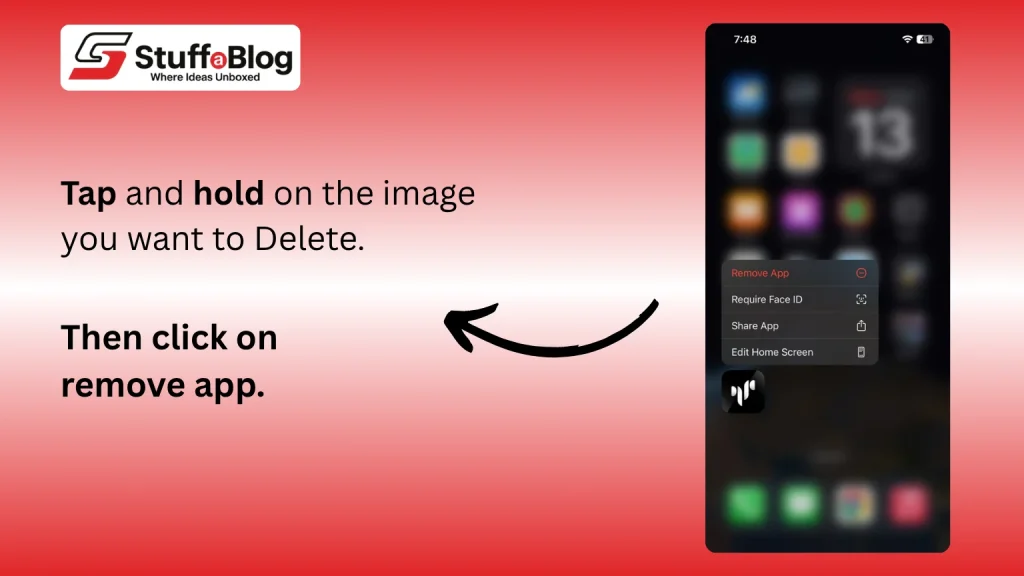
  • Remove from Home Screen: Tap and hold an app, then choose “Remove App” → “Move to App Library.” The app disappears from your Home Screen but stays installed in the App Library.
  • Hide Inside Folders: Drag apps into folders and place them on later pages within the folder. They’re not technically hidden, but easy to miss.
  • Use Screen Time Restrictions: Go to Settings → Screen Time → Content & Privacy Restrictions. You can block or limit certain apps based on age ratings or usage time.
  • Enable “Offload Unused Apps”: When this option is on, iPhone automatically removes apps you rarely use while keeping their data. You can reinstall them later without losing information.

How to Find Hidden Apps on an iPhone
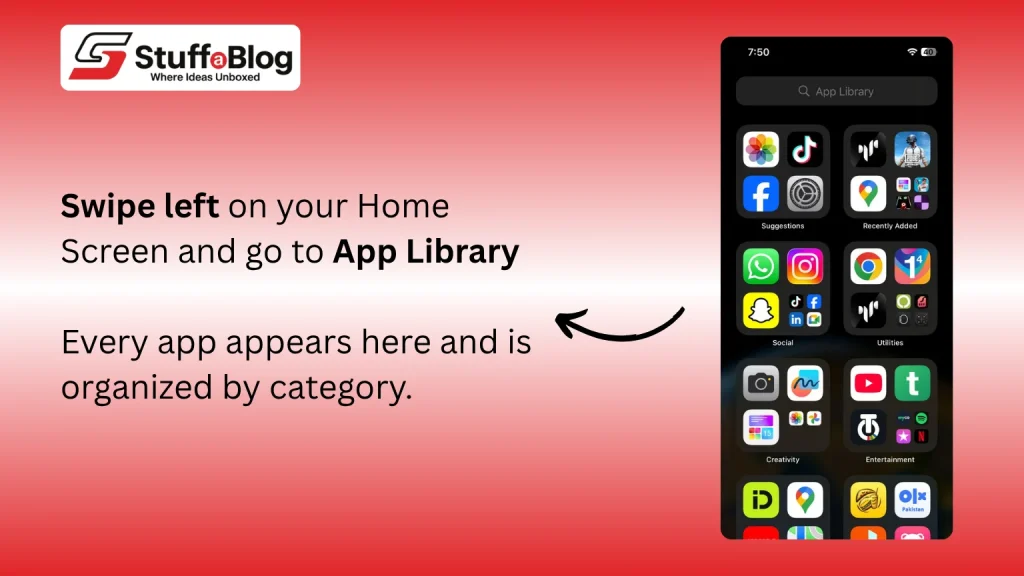
If an app seems missing, there are several built-in ways to locate it. Here’s how to find hidden apps on iPhone quickly and easily.

1. Use the App Library

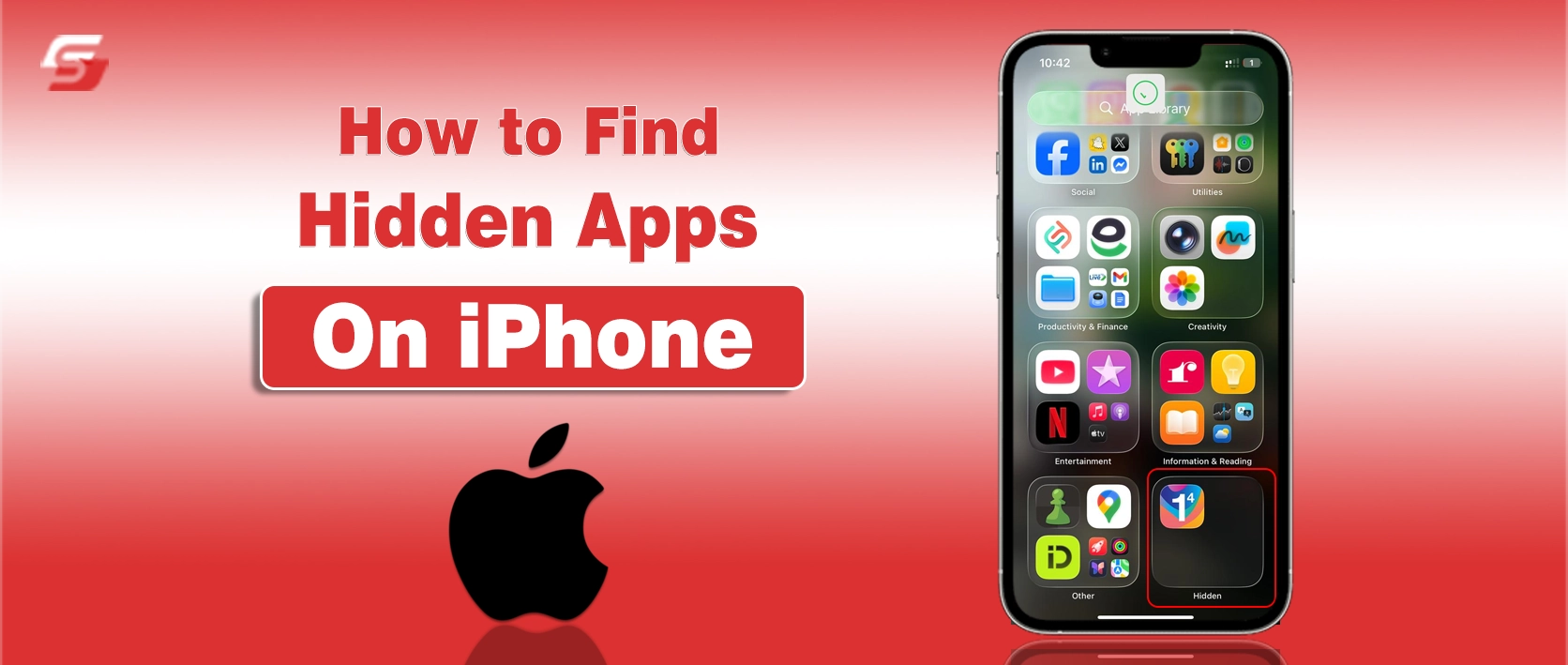
The App Library is your best friend for finding hidden apps. Swipe left on your Home Screen until you reach the App Library. Every app on your iPhone appears here, organized by category. You can scroll through or use the search bar at the top to type the app’s name. If it’s installed, it will show up immediately. Once found, press and hold the app, then drag it back to your Home Screen if you want it visible again.

2. Try Spotlight Search

Spotlight Search is another fast way to see hidden apps on iPhone. Swipe down on any Home Screen and type the name of the missing app in the search bar. If the app is installed, it will appear in the results. Tap to open it directly. You can also long-press the app icon and select “Add to Home Screen” to make it visible again.

3. Check Folders

Sometimes, apps aren’t really hidden, they’re just buried. Go through your folders one by one. Swipe through the pages within each folder, as apps can be tucked away inside multiple layers. You may also find unfamiliar icons for apps you haven’t used in a while. Always keep in mind that you do not scan the QR code on your phone that is provided by an unauthorized person.

4. Review Screen Time Restrictions

If the app still doesn’t appear, Screen Time might be hiding it. Go to Settings → Screen Time → Content & Privacy Restrictions. Tap Allowed Apps and ensure the app in question is turned on. If it’s disabled, it won’t appear on your Home Screen or App Library. Also, check App Limits and Always Allowed options to ensure the app isn’t restricted there either.

5. Check “Offload Unused Apps”

Some apps may not show up because your iPhone has offloaded them to save space. To confirm, go to Settings → App Store and look for the “Offload Unused Apps” option. If it’s on, iPhone automatically removes unused apps but keeps their data. You can reinstall the app from the App Store anytime, and your previous data will be restored.

6. Look in the App Store Purchase History

If you think the app might be hidden from your purchases, open the App Store and tap your profile icon. Select Purchased → My Purchases → Not on this iPhone. This section lists apps you’ve downloaded but hidden or removed from the device. Tap “Unhide” if you want to reinstall it.

7. Check for Configuration Profiles

Sometimes, apps can be hidden by installed profiles, especially if your phone is used for work or school. To check, go to Settings → General → VPN & Device Management. Review any profiles listed. If you see one you don’t recognize or trust, remove it. This may reveal apps that were hidden under those restrictions.

How to Delete Hidden Apps
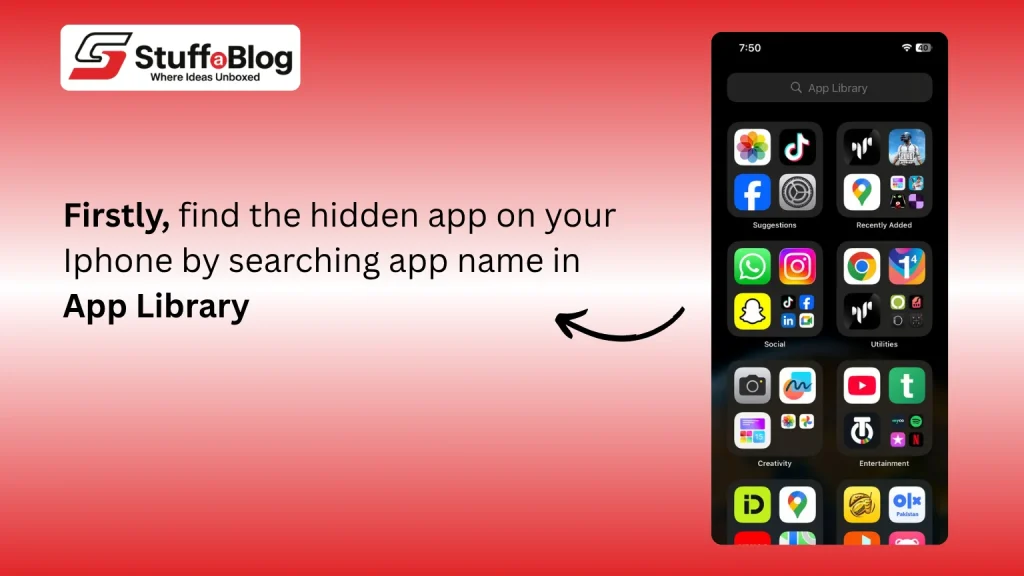
Sometimes, you may want to delete hidden apps entirely, especially if they’re unnecessary or suspicious. The process is simple.

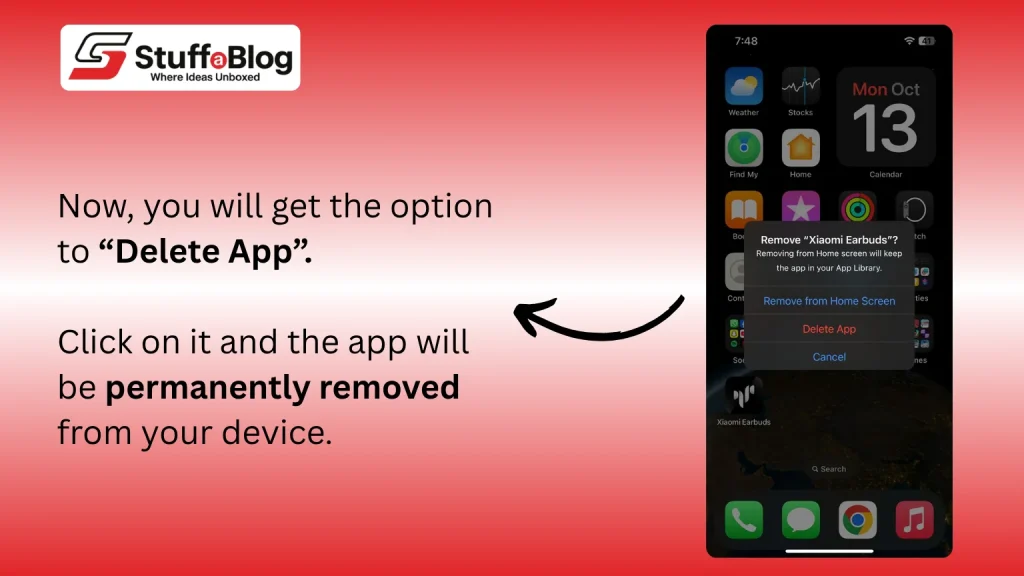
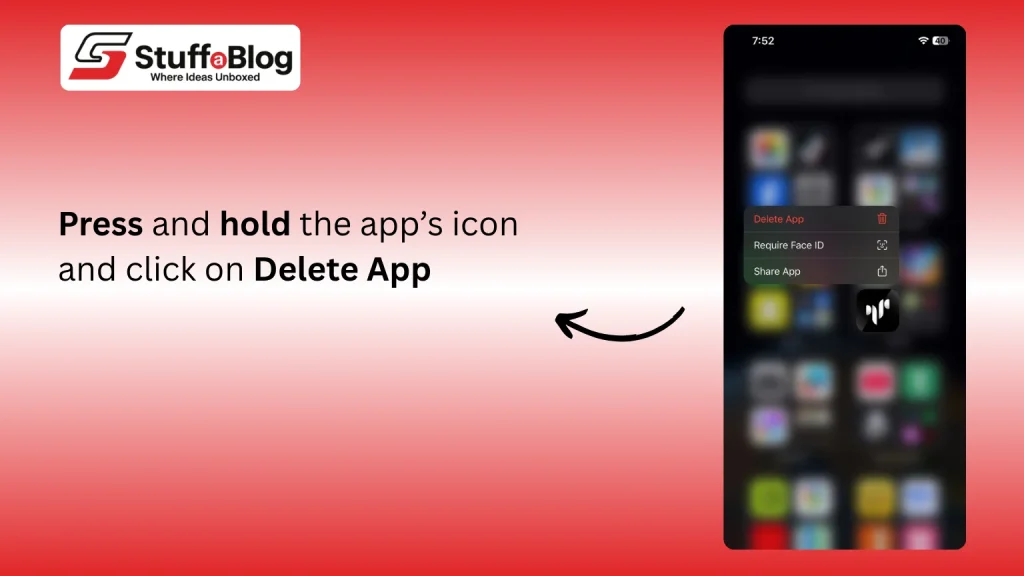
First, use the App Library or Spotlight Search to find the app. Once you locate it, press and hold the app’s icon. A menu will appear, select “Remove App,” and then tap “Delete App” to confirm. This completely removes the app and its data from your iPhone.

If the app was offloaded, deleting it removes even the saved data. You can also check Settings → General → iPhone Storage to see a list of all installed and offloaded apps. From there, you can delete any hidden apps directly.

How to Keep Your iPhone Protected from Suspicious Hidden Apps

In smartphones, it’s not only about finding hidden apps, it’s also about keeping your iPhone secure. Some hidden apps may be harmless, but others could pose privacy risks. Here’s how you can protect your device.

Start by setting a strong passcode or using Face ID or Touch ID. This ensures only you can install or move apps. Enable Screen Time → Content & Privacy Restrictions to control which apps can be downloaded or used. Avoid installing apps from unknown developers or links sent through messages.

Another good practice is reviewing your app permissions. Go to Settings → Privacy & Security and check what data each app can access. Revoke permissions for apps that don’t need them. Also, avoid installing unknown configuration profiles or MDMs, as they can control what appears on your screen.

Final Thoughts

It’s easy to lose track of a few apps when your iPhone is filled with folders and updates. But knowing how to manage and locate them saves time and keeps your device organized. Apple’s built-in settings, like the App Library and Screen Time, make it simple to reveal or remove apps you can’t see. If you ever feel your apps are missing, the above steps will help you bring them back without hassle.

Frequently Asked Questions (FAQs)

Can apps hide without my knowledge?

Yes, sometimes profiles or restrictions can hide apps. Always check configuration profiles and Screen Time limits.

How to protect an iPhone from secret apps?

Avoid downloading apps from untrusted sources, review app permissions regularly, and keep your iOS updated.

How to see hidden apps on iPhone using settings?

Go to Settings → Screen Time → Allowed Apps or General → iPhone Storage to view all installed and hidden apps.


hidden apps iOS settings iPhone tips iPhone tricks mobile privacy tech guide
Share. Facebook Twitter Pinterest LinkedIn Tumblr Email
Previous ArticleOffset Net Worth and How the Rapper Built His Fortune Beyond Migos
Next Article Top 10 Best Free Rap Generator Tools to Turn Ideas into Fire Lyrics
Fartash Shahzaib

Fartash Shahzaib is an SEO content writer with 3 years of experience. He has helped over 100 businesses grow through keyword-focused blogs on net worth, business, and digital trends. His writing improves rankings while keeping content clear, engaging, and easy for readers to connect with.

Related Posts

Chargeback Reduction Guide for Businesses
Business

Why Reduced Chargebacks Now Depends on Better Fraud Decisions Upstream

By Brian WallaceApril 1, 2026
Two individuals tending to plants in a multi-tiered vertical farming setup under artificial lights, with trays of produce in hand.
Lifestyle

How Vertical Farming Can Transform Food Sourcing in Major Cities

By John OcamposMarch 26, 2026
Ztec100.com Tech Health and Insurance
Health

Ztec100.com Tech Health and Insurance – A Detailed Guide

By Saad ShahMarch 10, 2026
What is Intelligent Frame Creation
Tech

What is Intelligent Frame Creation? Why You Might Use or Disable It

By Fawad MalikFebruary 27, 2026
Best NLP Testing Tools
AI & ML

5 Best NLP Testing Tools to Improve AI Language Models in 2026

By Boris DzhingarovFebruary 26, 2026
MioCreate Review
AI & ML

MioCreate Face Swap Review 2026: Features, Free Limits & Alternatives

By Noman SarwarFebruary 23, 2026
Add A Comment

Comments are closed.

Don't Miss
Helena Bonham Carter news banner regarding her exit from The White Lotus.

Helena Bonham Carter Exits The White Lotus Season 4 as Mike White Orders Major Script Rewrites

By Fawad MalikApril 25, 2026

In the Spotlight The French Riviera was set to be the stage for Helena Bonham…

Mike Vrabel speaking at a press conference regarding his future with the New England Patriots.

Mike Vrabel Admits Previous Actions Failed His Standard as New 2020 Photos Emerge

April 24, 2026
Portrait of musician Jelly Roll on a news graphic discussing his NYC Marathon goal and weight loss journey.

Jelly Roll Eyes 2026 NYC Marathon After Overcoming Weight Loss Setback

April 23, 2026
Cast of Mormon Wives posing in white dresses for a production update on Stuffablog.com.

The Secret Lives of Mormon Wives Resumes Filming Without Taylor Frankie Paul

April 22, 2026
Top Posts
How to Become Famous

How to Become Famous? Top 10 Ideas to Start

January 31, 2025
What is a salary package breakdown including basic salary, allowances, bonuses and benefits

What is a Salary Package? Structure, Calculation and Example

March 26, 2026
Top 12 Most Popular TV Shows of All Time

Top 12 Most Popular TV Shows of All Time

February 1, 2026
Net Worth

Net Worth Overview and How to Calculate It

February 4, 2026
Stay In Touch
  • Facebook
  • Twitter
  • Pinterest
  • Instagram
  • YouTube
  • Vimeo

Subscribe to Updates

Get the latest creative news from SmartMag about art & design.

About Us
About Us

Stuffablog covers the latest breaking news, business, technology, celebrity net-worth updates, entertainment, and how-to guides that you can trust. StuffaBlog is your best content sharing platform with a wide range of interesting articles and informative content. From technology to lifestyle tips, and productivity habits.

Facebook X (Twitter) Pinterest YouTube WhatsApp
Our Picks
Helena Bonham Carter news banner regarding her exit from The White Lotus.

Helena Bonham Carter Exits The White Lotus Season 4 as Mike White Orders Major Script Rewrites

April 25, 2026
Mike Vrabel speaking at a press conference regarding his future with the New England Patriots.

Mike Vrabel Admits Previous Actions Failed His Standard as New 2020 Photos Emerge

April 24, 2026
Portrait of musician Jelly Roll on a news graphic discussing his NYC Marathon goal and weight loss journey.

Jelly Roll Eyes 2026 NYC Marathon After Overcoming Weight Loss Setback

April 23, 2026
Most Popular
StuffaBlog

StuffaBlog Overview – An Introductory Tale

May 20, 2014
Hourly Staff

Guide for Handling Hourly Staff – Best Strategies

May 14, 2024
What is Commonlit

What is Commonlit and How Does It Work? – Detailed Guide

March 31, 2024
  • Home
© 2006 - 2026 Stuffablog.com - All rights reserved.

Type above and press Enter to search. Press Esc to cancel.